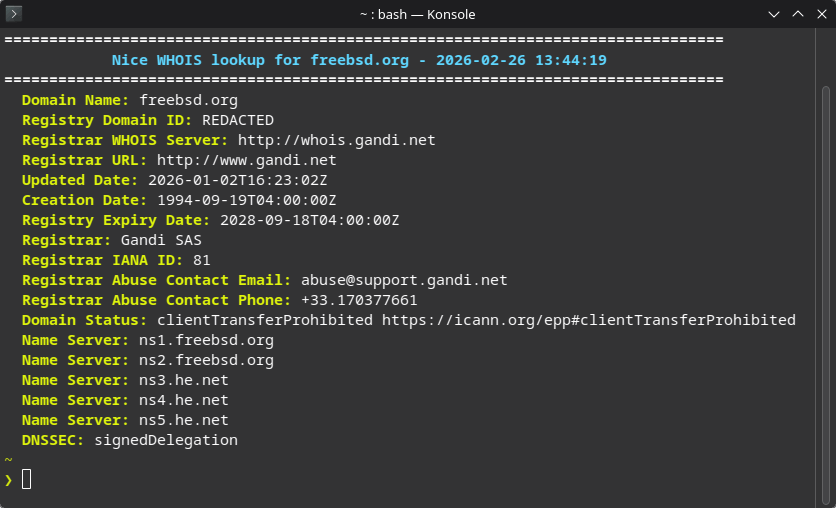
Nice WHOIS is a Bash script that performs clean, color-formatted WHOIS lookups. It parses and deduplicates raw whois output, strips boilerplate legal notices, and falls back to RDAP or web lookups when standard whois is unavailable. It also resolves the correct whois server via IANA when the local client fails, making TLDs like .org work out of the box.
Preview
Features
- Clean, color-formatted output.
- Deduplication of repeated whois key-value pairs while preserving multi-value fields (for example nameservers and statuses).
- Boilerplate/legal text filtering with configurable skip patterns (
SKIP_BLOCKS,SKIP_KEYS). - Automatic IANA whois server discovery and retry (
whois.iana.org), which lets lookups succeed for TLDs that the localwhoisclient does not handle correctly by default. - RDAP fallback when whois fails or is blocked, with per-TLD RDAP overrides (
RDAP_SERVERS) plusrdap.orgfallback. - Web fallback for TLDs with no public whois/RDAP (
WEB_WHOIS). - Nameserver handle expansion (resolves handle-style nameserver IDs to hostnames).
- Input validation and timeout-based lookups to avoid hanging queries (
WHOIS_TIMEOUT, default 3 seconds).
Lookup Flow
The script resolves domain information using a multi-step fallback strategy:
- Validate input – require exactly one domain argument and validate domain format.
- Web-only exit – if TLD is listed in
WEB_WHOIS, print the registry web lookup URL and stop. - Standard whois attempt – run
whois <domain.tld>with timeout. - IANA-assisted whois retry – if failed/blocked, query
whois.iana.orgfor authoritative server and retry withwhois -h. - RDAP fallback – if whois still failed/blocked, query
RDAP_SERVERS[tld]override when present, otherwisehttps://rdap.org/domain/<domain>. - RDAP parsing path – print domain, statuses, events, DNSSEC, registrar details, and nameservers from JSON.
- WHOIS parsing path – if whois succeeded, detect “not found”, then parse/clean output, filter boilerplate, deduplicate repeated KVs, and print formatted result.
- Nameserver handle resolution – for handle-style nameserver values from whois output, perform follow-up lookups and print resolved hostnames.
Requirements
whois– standard whois clientjq– JSON processor (required for RDAP fallback)curl– HTTP client (required for RDAP fallback)
# Debian/Ubuntu
sudo apt install whois jq curl

# RHEL/Fedora
sudo dnf install whois jq curl

# Arch
sudo pacman -S whois jq curl
Usage
- Make the script executable:
chmod +x nw.sh- Run the script:
./nw.sh example.comAdding Nice WHOIS to PATH
To run nw from anywhere without specifying the full path:
- Option A – Symlink to a directory already in PATH:
sudo ln -s /full/path/to/nw.sh /usr/local/bin/nw- Option B – Add the script’s directory to PATH:
Add the following to your shell profile (~/.bashrc or ~/.zshrc):
export PATH="$PATH:/full/path/to/nw-directory"Then either restart your terminal or reload:
source ~/.bashrc- Option C – Shell alias:
Add to ~/.bashrc or ~/.zshrc:
alias nw='/full/path/to/nw.sh'After any of these, you can run:
nw example.comConfiguration
WHOIS_TIMEOUT – Timeout in seconds for whois queries (default 3).
WEB_WHOIS – TLDs with no public whois or RDAP. The script will display the web URL and exit immediately.
declare -A WEB_WHOIS=(
    ["es"]="https://www.dominios.es/en"
)
RDAP_SERVERS – TLDs that need a specific RDAP endpoint (when rdap.org does not cover them).
declare -A RDAP_SERVERS=(
    ["ch"]="https://rdap.nic.ch"
    ["li"]="https://rdap.nic.ch"
    ["me"]="https://rdap.identitydigital.services/rdap"
)
SKIP_BLOCKS – case-insensitive substring patterns used to skip noisy whois blocks.
SKIP_KEYS – case-insensitive key-prefix patterns used to skip noisy key-value lines (without matching user data values).